

Table of Contents
- Step 1: Confirm Your Preorder and Save the Order Number
- Step 2: Read Your Gundam Model Kit Release Schedule
- Step 3: Locate Your Tracking Number in the Account Dashboard
- Step 4: Set Up Email, SMS, and Restock Notifications
- Step 5: Use Gundam Collection Tracker Apps for Cross-Platform Orders
- Step 6: Handle Delays, Cancellations, and Backorders
- Step 7: Track International Shipments and Retailer Differences
- Frequently Asked Questions
Last Updated: September 23, 2026
Step 1: Confirm Your Preorder and Save the Order Number
The moment your Gundam preorders go through, save the order number somewhere you'll actually find it later. That single string of digits is your key to everything that follows: tracking, cancellations, and support requests.
- Screenshot the confirmation page before you close it
- Star or flag the confirmation email immediately
- Save the order number in your phone's notes app
- Write down the retailer's name and order date
Step 2: Read Your Gundam Model Kit Release Schedule
A Gundam model kit release schedule is the manufacturer's timeline for when a kit leaves production and reaches retailers. It is not the same as your ship date, and treating the two as interchangeable is the single most common reason collectors think their order is "late" when it is actually on track.
How the Schedule Is Actually Built
Most kits move through a repeating cycle:
- Solicitation window: the manufacturer announces the kit and opens wholesale ordering to retailers. This is when shops decide how many units to reserve.
- Preorder window: retailers open customer preorders, often weeks or months before the kit ships.
- Release date: the kit officially launches and leaves the factory.
- Allocation: the manufacturer ships units to retailers based on how many they ordered and how much stock exists.
- Batch processing: large releases ship in waves, not all at once.
That allocation step is where most confusion lives. A retailer can open 500 preorders and receive 200 units in the first shipment. Your order number determines where you sit in the queue, which is why saving it in Step 1 matters.
The Dates You'll See, and What They Mean
- Release date: when the kit officially launches. This is a manufacturer date, not a delivery date.
- Estimated arrival date: when the retailer expects stock in their warehouse. This is the date that actually affects your shipment.
- Preorder window: the period you can reserve a kit before the retailer closes orders.
- Ship date: when your specific order leaves the retailer. This is the only date tied to your tracking number.
A common pattern is a kit with a release date in one month and a retailer arrival date two to six weeks later. That gap is normal transit and allocation time, not a delay.
Why Kits Slip
Factory delays, port congestion, and production reruns all push dates. When a manufacturer announces a delay, retailers usually update the product page and email preorder customers. If you only check the release date once, you'll miss the update.
Matching the Schedule to Your Order Type
An official brand store typically ships close to the release date because they receive first allocation. A third-party retailer may ship weeks later because they sit further down the allocation chain. Neither is wrong; they are different positions in the same pipeline. Knowing which type of store you ordered from tells you which date to actually watch.
Step 3: Locate Your Tracking Number in the Account Dashboard
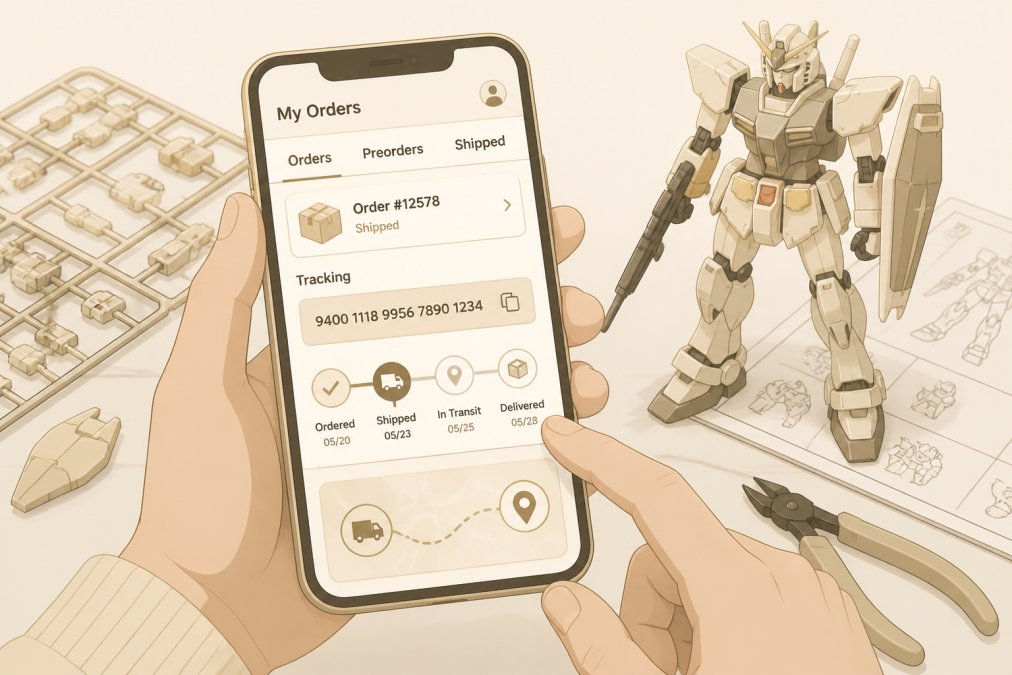
Your tracking number lives in your account dashboard under order history. Log in, open the order, and look for a shipment update or tracking portal link. That number is your window into package transit. Copy it and paste it into the carrier's own tracking site for the most current status. Verifying the authenticity of your shipment remains just as vital as monitoring its progress, especially when spotting fake merchandise becomes a necessary skill for any serious collector.
Where the Number Actually Hides
Retailers bury tracking in different places, so know the common spots:
- Order history list: the tracking link often appears inline next to the order status, not inside the order detail.
- Order detail page: look for a "Shipments" or "Fulfillment" tab separate from the order summary.
- Shipping confirmation email: the tracking number is usually a clickable link, but the raw number is often printed below it.
- Account notifications: some stores post a shipment message in an in-app inbox before emailing you.
If You Checked Out as a Guest
Guest orders don't appear in an account dashboard. Use the order lookup tool on the retailer's site, which typically asks for your order number plus the email you used at checkout. If the retailer has no lookup tool, search your email for the order confirmation and use the tracking link inside it. This is another reason Step 1 tells you to save the order number immediately.
When Tracking Is Missing or Stalled
A tracking number that exists but never updates is different from no tracking number at all.
- Label created, no scans for several days: common during high-volume release weeks. The carrier has the label but not the package.
- No tracking after the ship date: contact the retailer first. They can confirm whether the package actually left the warehouse.
- Tracking stops mid-transit: wait 48 hours, then contact the carrier. If the carrier can't locate it, file a claim through the retailer, not the carrier, since the retailer is your seller.
- Tracking shows delivered but nothing arrived: check porches, mailboxes, and neighbors first, then contact the carrier and retailer the same day.
What Each Tracking Status Actually Means
Tracking labels confuse people because carriers use vague terms. Here's the plain-English version most guides skip:
| Status | What It Means | What To Do |
|---|---|---|
| Label created | Shipping label printed, item not yet handed to carrier | Wait; no movement is normal for 1-2 days |
| Accepted | Carrier has the package | Normal; transit starting |
| In transit | Package moving between facilities | Track normally |
| Out for delivery | On the truck today | Be home or check the door |
| Delivered | Left at your address | Check porch and mailbox |
| Exception | Delay, damage, or address issue | Contact the carrier, then the retailer |
Step 4: Set Up Email, SMS, and Restock Notifications
Notifications are the difference between catching a restock and missing it. Turn on every alert the retailer offers.
Set up these notification types:
- Shipping confirmation with tracking
- Shipment update at each transit scan
- Delivery window alerts on the final day
- In-stock notification for wishlist items
Set your restock alerts for the kit, not the brand. Brand-wide alerts flood your inbox and you'll start ignoring them. Kit-specific alerts are the ones that actually land a preorder.
Step 5: Use Gundam Collection Tracker Apps for Cross-Platform Orders
Gundam collection tracker apps pull orders from multiple retailers into one view. That solves the biggest headache in this hobby: orders scattered across five different stores.
What to log for every order:
- Retailer name and order number
- Kit name, scale, and grade
- Release date and estimated arrival
- Tracking number once it ships
Step 6: Handle Delays, Cancellations, and Backorders
Shipping delays happen. Understanding retailer policy before you order saves you a fight later.
Know these terms before you buy:
- Backorder: the item sold out but the retailer expects more
- Order cancellation: you cancel before shipment; rules vary by store
- Order verification: some stores confirm large orders before shipping
- Retailer policy: the store's rules on delays, refunds, and cancellations
Step 7: Track International Shipments and Retailer Differences
International orders add a layer most guides ignore. Once a package crosses a border, tracking often goes quiet for days.
Two things change with international shipments:
- Tracking updates slow down once the package leaves the origin country
- The final delivery carrier may differ from the one that shipped it
Frequently Asked Questions
How do I know if my Gundam preorder has been processed?
Check your account dashboard for an order status change from 'Processing' to 'Preparing for Shipment.' You should receive a shipping confirmation email with a tracking number once the warehouse assigns your kit. If the estimated arrival date passes without an update, contact customer support with your order number. Most retailers process preorders in batches, so your kit may ship a few days after the official release date.
What should I do if my Gundam preorder is delayed?
First, check the retailer's Gundam model kit release schedule for updated dates. Bandai sometimes pushes back releases by weeks or months. If your order shows no movement past the estimated arrival date, reach out to customer support and ask for a revised delivery window. You can usually cancel for a full refund if the delay exceeds the retailer's stated policy window. Keep your order confirmation email handy as proof of purchase.
Are there apps or tools to track my Gundam collection and preorders?
Yes. Gundam collection tracker apps let you log preorders, wishlist items, and built kits in one place. Many support barcode scanning and sync across devices. For shipping, carrier tracking apps aggregate updates from multiple carriers so you see every package in one dashboard. Combining a collection tracker with carrier alerts gives you a single view of what is arriving, what is delayed, and what you already own.
What is the difference between a preorder and a backorder for model kits?
A preorder reserves a kit before its official release date, and the retailer ships it once inventory arrives. A backorder means the item already released but sold out, and you are waiting for a restock. Preorders typically have a fixed release date; backorders have no guaranteed timeline. Both may require payment upfront or at shipment. Check the product page label carefully so you know which situation applies before you buy.
Tracking Gundam preorders comes down to one habit: stay on top of your order from confirmation to delivery. Save the order number, watch the release schedule, and turn on notifications so nothing slips past you.
Utopia Toys and Models makes that easier with transparent availability info, a wide range of Bandai, Funko, and Kotobukiya products, and reliable shipping for in-stock items. Get started with Utopia Toys and Models and keep your collection growing without the guesswork.